G5 upgrade, help needed on a couple of things

Hello,


I have an iMac G5 1.8 model A1058 with 2gb of ram running Panther 10.3.9 and I want to upgrade to Leopard 10.5.8

I have been told I cannot buy this software from Apple anymore so I looked on ebay instead but I'm worried about buying an incorrect version (some say intel processor for example which I assume will not work on my machine)

Can anyone point me in the right direction for the correct version for my machine please ?


Also, once upgraded to 10.5 will I be able to use Google Chrome and a magic mouse ?


The other thing is I want to fit a bigger hard drive at the same time (250GB) but the replacement drive I have has a different operating system on it and will need to be wiped so my question is, how would I go about this, as the G5 will not boot from the replacement drive ?

Do I put the osx disk in the cd drive, shut down, swap the hdd's over and just start the machine up again ?

Are all osx disks bootable ?


Apologies in advance if the questions are daft.


Thanks.

iMac, Mac OS X (10.3.x)

Posted on Mar 2, 2014 11:11 AM

Reply
3 replies

Mar 2, 2014 3:35 PM in response to tenchiten

Well, there's a few items to address.

So I won't attempt them all, even if

I know some of the answers...


You should get a good external enclosure

for the extra hard disk drive, so you can

use the running Mac OS X 10.3.9 to

secure erase it. This means you'd want

the Disk Utility in Panther, to write one-

pass of Zeros over the old content. Then

format it for use in the Mac OS X. You

may have to do this again once you find

a retail or replacement full installation

DVD for Mac OS X Leopard 10.5 to be

sure the utility did put the correct format

on the former PC HDD & it works. Then

you may be able to install Leopard 10.5

on that hard disk drive while it is attached

to the tower, and later on, install the HDD.


{And this way, if the 250GB HDD from a

PC is not quite right, you will know w/o

taking the working OSX out of the Mac.}


You may be able to get a plain white label

replacement or install DVD from Apple.


These would not necessarily be 'retail'

but if available, may work across a range

of computers. Or they may all say No.


Not sure, though as results from asking

Apple Sales Support or AppleCare by

phone can get different +/- responses.


If you call Apple at their phone support and

have the product (Mac) serial number handy

and the model number, they may try to see

if a match can be made. The disc costs a fee.


Restore Tiger 10.4 & Leopard 10.5 DVDs

are said to be available from Apple, call

1 (800) 275-2273 - & have CC handy...

if you get very lucky.


You may be able to see if OWC, powerbookmedic

and other resellers of Apple stuff have retail 10.5

DVDs, these can sell for more than original price.

You could also be on the lookout for iLife '09.


PS: a Magic Mouse uses Bluetooth. Not sure of

the OS X support in 10.5.8, but no BT, no MM.


Google Chrome? An energy hog, lucky you

not available for PowerPC G4/G5; only intel.


Good luck & happy computing! 🙂

Mar 3, 2014 10:35 AM in response to tenchiten

I have been told I cannot buy this software from Apple anymore so I looked on ebay instead but I'm worried about buying an incorrect version (some say intel processor for example which I assume will not work on my machine)

Can anyone point me in the right direction for the correct version for my machine please ?

You need the full install version of 10.5. These dvds are black. The grey dvds are machine/model specific & avoid these.


Also, once upgraded to 10.5 will I be able to use Google Chrome

From what I remember, chrome is intel only.

Use TenFourFox instead.


The other thing is I want to fit a bigger hard drive at the same time (250GB) but the replacement drive I have has a different operating system on it and will need to be wiped so my question is, how would I go about this, as the G5 will not boot from the replacement drive ?


Format it with the disk utility on the 10.5 dvd. It's under utilities.


Do I put the osx disk in the cd drive, shut down, swap the hdd's over and just start the machine up again ?

The startup manager will list all of your bootable partitions then give you a choice of which to boot. Hold down the option key then power on. Continue holding down the option key until you see the startup manager. This brings up the startup manager. Click on your hd or disc. Click on right arrow key.

Are all osx disks bootable ?


Only x cd/dvds that are are compatible with your machine will boot. All install cd/dvds will boot on compatible machines.


Robert


-------------------


Format a disk using the installation DVD

How to run disk utility from your startup DVD.

  1. Insert your startup DVD into your reader. Power down your machine. Hold down to the c key. Power on your machine. This will bootup your startup DVD. ( Alternatively, you may hold down the control key, this brings up the startup manager. Click on the desired volume. Click on the right arrow. )
  2. This will bring you to a panel asking you for your language. Pick your language.
    User uploaded file
  3. You you come to the Install Mac OS panel. Do not install just yet.
  4. Click on Utilities menu item. This will give you a pulldown list of utilities.
    User uploaded file
  5. Click on the disk utility. This will start up disk utility.
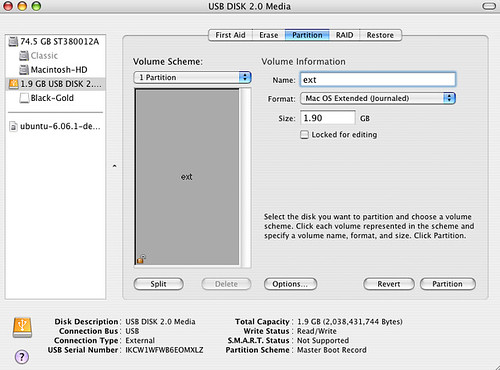
    On the left pane view, you will see a list of all your disks. Click on the external disk.
    Click on the partition tab.

    User uploaded file


  6. You will now see how your external disk is currently set up. Fill in the information as appropriate. You should pick Mac OS Extended (Journaled).
  7. You may wish to verify the correct partition type. Disk Utility should pick the correct partition type for your machine. Click on the "Option" button near the bottom of the window. Select "Apple Partition Map" for the PowerPC, G3, G4, and G5. PowerPC Macs require the Apple Partition Map for their boot drives.
    Note: GUID partition type is for booting Intel Macs. Intel Macs are from 2006 to the present. Master Boot Record is for disk or flash drives you want to share with Windows. Swampus pointed this out to me.


Additional information


More details on formatting.
http://www.kenstone.net/fcp_homepage/partitioning_tiger.html

To format the startup drive, you will need to run disk utility from your installation DVD.


This article will tell you how to get to disk utility. Once in a disk utility, you can go and format the disk.

http://support.apple.com/kb/TS1417

To format your startup drive, you will need to run disk utility from your startup DVD.
Mac OS X 10.4: About the utilities available on the Mac OS X 10.4 Install DVD

http://support.apple.com/kb/HT2055

This thread has been closed by the system or the community team. You may vote for any posts you find helpful, or search the Community for additional answers.

G5 upgrade, help needed on a couple of things

Welcome to Apple Support Community
A forum where Apple customers help each other with their products. Get started with your Apple Account.